
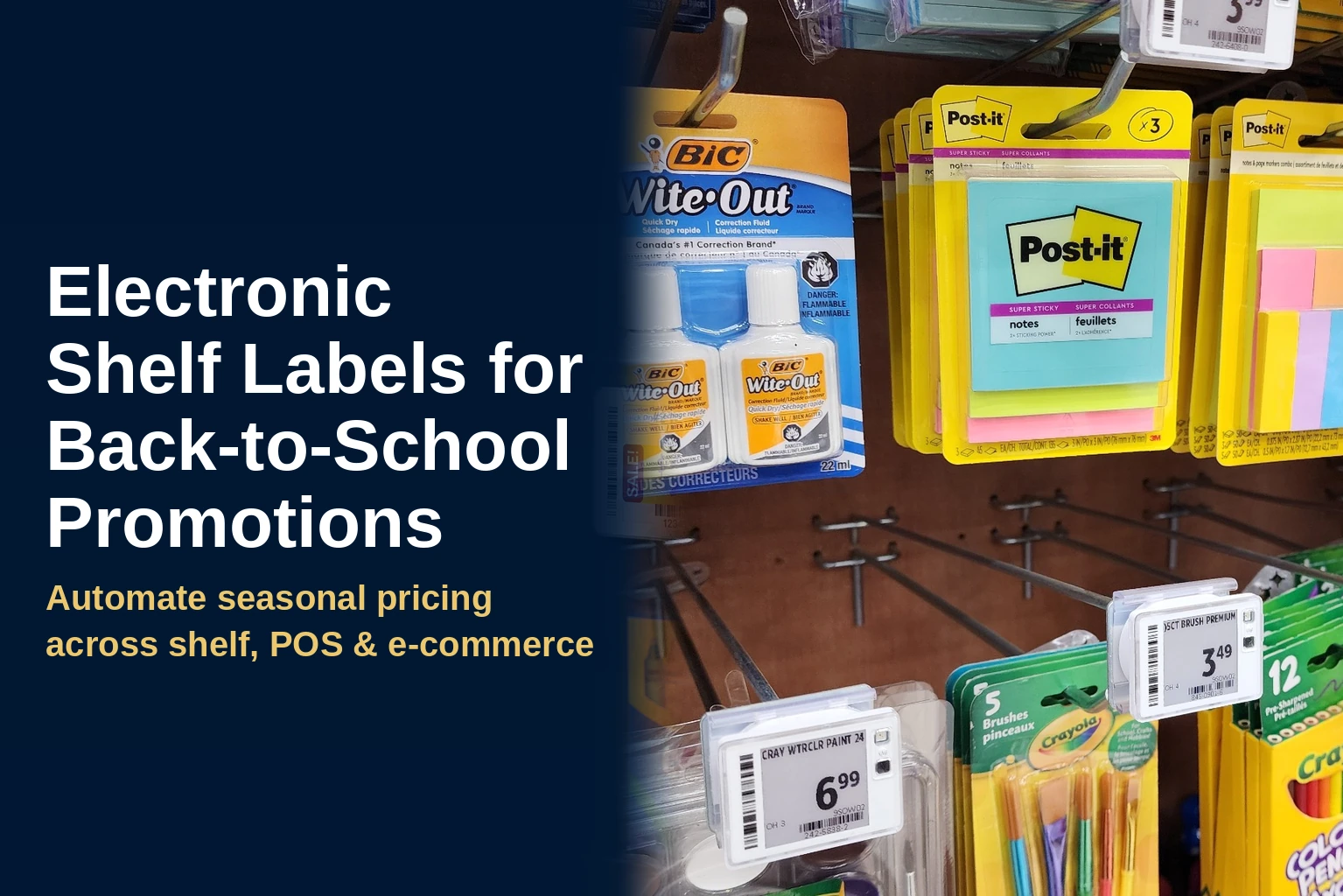
Late summer campaigns can compress hundreds or thousands of price changes into a few weeks. Electronic shelf labels for promotions let retailers schedule category-wide updates in advance, display approved prices at the shelf, and reduce the manual work of printing and replacing paper tags.
That matters when back-to-school retail pricing overlaps with summer clearance, vendor-funded promotions, and fall assortment resets. A connected ESL rollout helps retailers launch promotions on time, keep shelf prices aligned with the retailer’s approved pricing source, and give store teams more time for replenishment and customer service. When POS, e-commerce, and mobile channels use that same source of truth, retailers can also reduce cross-channel pricing differences.
For retailers, that translates into four practical advantages:
|
Why July and August Promotions Are Hard to Execute Manually
Back-to-school campaigns rarely affect only one department. School supplies, apparel, electronics, lunch products, seasonal merchandise, and clearance inventory may all follow different promotional calendars within the same few weeks. At the same time, employees are replenishing shelves, building seasonal displays, helping customers, and preparing for fall assortment changes.
With paper labels, every affected SKU needs a correctly printed tag that reaches the right shelf and is installed at the right time. A missed tag can create a shelf-to-register mismatch, while a delayed batch can shorten the effective selling window.
For multi-store retailers, the risk multiplies. One location may complete a promotional change before opening, another may still be replacing tags at midday, and a third may miss part of the batch. The core retail promotion execution challenge is consistency: every participating store and channel must display the approved price for the full campaign period.
How ESLs Automate Category-Level Promotional Pricing
Much of the pricing activity during July and August happens at the category level. A school-supply aisle may move to promotional pricing on the same morning that summer apparel enters a new clearance stage and seasonal merchandise begins its fall reset.
With electronic shelf labels, an approved category-level update can be sent from the retailer’s pricing system to the associated labels. This price change automation reduces the need to print, sort, distribute, and replace tags across dozens or hundreds of participating SKUs.
ESL promotional pricing can follow scheduled start and end times. When the promotion begins, the ESL platform sends the approved promotional price to the associated labels. When the defined promotional window ends, the scheduled workflow returns the labels to the approved regular price held in the back-end ERP.
Scheduling protects the full promotional window. A late launch reduces the time available to sell at the advertised price, while a late end date may leave products discounted longer than intended. Store teams can focus on verifying displays, replenishing inventory, and resolving exceptions instead of remembering separate tag-change dates for every campaign.
Using digital price tags for promotions reduces the risk that only part of a category change reaches the shelf. Retailers can use centralized visibility into update status to see which stores or departments are current and which require attention, instead of searching aisles for paper tags that may have been missed.
Managing Overlapping Promotional Calendars
Back-to-school campaigns often run alongside summer clearance, vendor-funded promotions, loyalty promotions, and fall resets. Retailers should map these activities in one promotional calendar before loading prices into the system. The calendar should identify participating products, locations, customer channels, start and end times, approval owners, and products that follow a different pricing rule. Formal approval details, including who approved a price and when, should be recorded in the back-end ERP rather than the ESL platform.
This planning is especially important when one item appears in more than one campaign. A lunch product, for example, may qualify for a back-to-school offer while also belonging to a vendor-funded promotion. The retailer needs a clear rule for which offer takes priority and which price should apply when one campaign ends before the other.
Electronic shelf labels execute the pricing instructions they receive, but they do not replace campaign governance. Clear promotion priorities, accurate product associations, and documented exception rules help prevent conflicting updates, incorrect price changes, and unexpected price reversions across stores and channels.
Keeping Shelf, POS, and E-commerce Pricing Aligned
For promotions intended to run across channels, the shelf, checkout, website, and mobile app need to display the same approved price. If one channel updates before another, shoppers may see an online offer that does not match the shelf or register.
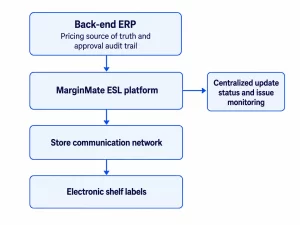
Effective omnichannel price synchronization starts with the back-end ERP as the pricing source of truth. The ERP retains the approved price and formal approval record, while connected POS, e-commerce, mobile, and ESL workflows use that pricing data. MarginMate connects the ESL platform to the retailer’s ERP or approved integration layer so the correct price reaches the shelf. The retailer’s POS, e-commerce, and mobile systems must also be configured to use the same approved pricing data.
Each connected system or workflow must follow the approved campaign rules, but the potential point of failure differs across the retail environment.
| System or Touchpoint | What Must Match | Common Risk |
| Shelf and ESLs | Approved price and promotional start and end times | A late or missed label update |
| POS and checkout | Effective promotional price and campaign timing | A shelf-to-register mismatch |
| E-commerce and mobile | Price, timing, and offer eligibility | An online offer that differs from the in-store price |
| ESL update monitoring | Current update status and issue ownership | An operational issue is not investigated promptly |
Consider a back-to-school promotion scheduled to begin at 6 a.m. on a Saturday. If the website updates at midnight but employees do not replace paper shelf tags until after opening, shoppers may encounter different prices online and in the store. Configuring each channel to follow the same approved promotional schedule reduces that timing gap.
The ESL platform gives teams a centralized view of update status across stores and departments, but it is not the system of record for price approvals. Details such as who approved a price and when remain in the back-end ERP. MarginMate keeps only a short-term audit trail of the changes it receives, which is useful for checking against the ERP record rather than replacing it.
When a location or update requires attention, pricing, IT, or store teams can investigate the product data, integration, label connection, or campaign setup before the issue affects customers.
This process also reduces checkout interruptions. When the shelf and register receive prices from the same approved workflow, employees spend less time investigating disputes and more time serving customers.
Using SmartFLASH and Back Pages for Replenishment and Pick Lists
Pricing accuracy is only one part of seasonal promotion execution. Retailers must also keep high-velocity products available and complete online orders efficiently during the busiest weeks of a campaign.
MarginMate labels support multiple display pages. Customer-facing pages show pricing and product information, while Back Pages, accessible from any logged-in Android or iOS device, can display stock quantity on hand, replenishment flags, and other operational data when the relevant inventory information is connected. Employees can access this information at the shelf instead of leaving the aisle to perform a separate manual check.
SmartFLASH activates a flashing LED on a selected label in under one second. It guides staff to the correct shelf location for put-to-light replenishment, click-and-collect picks, shopper pick lists, or inventory checks. In busy seasonal campaigns, that visual guidance can make products easier to locate across standard shelves, secondary displays, and crowded aisles.
SmartFLASH and Back Pages also connect pricing, replenishment, and picking workflows, giving store teams shelf-level information while reducing the time spent on paper tag changes.
Common Seasonal Promotion Mistakes to Prevent
Seasonal promotion problems often begin with campaign setup rather than the shelf label itself. Retailers should check for the following issues before launch:
- Products assigned to the wrong promotional category
- Missing associations between products and shelf labels
- Secondary displays that were not included in the campaign setup
- Mismatched promotional start or end times across ESL, POS, e-commerce, and mobile workflows
- Products that should remain on clearance after the main campaign ends
- Updates requiring attention without a clearly assigned owner or escalation process
A pre-launch test using a small group of products can reveal these issues before the complete promotional file is distributed. Retailers should test the price change, confirm its appearance across channels, verify update status, and check that the products return to their expected prices when the test ends.
For more rollout guidance, check MarginMate’s electronic shelf label resources covering integrations, implementation, and store-level planning.
Assigning Responsibilities Across Retail Teams
Seasonal promotions depend on several teams, and unclear ownership can delay the response to an exception. Pricing teams approve the offer, effective dates, and participating products. Digital commerce teams verify that the campaign appears correctly on the website and in the retailer’s mobile experience. IT or integration teams monitor the systems that move pricing data between platforms, while store teams confirm that shelf displays and secondary product locations are ready.
Before launch, the retailer should assign an owner for each type of issue. A product-data error may require the merchandising or pricing team, while a failed system connection may require IT or an integration partner. An issue affecting an individual label or store location may require store-level investigation.
Clear escalation rules ensure that each issue reaches the team responsible for resolving it. They also help stores resolve problems before opening rather than waiting for an answer during a high-traffic period.
A Promotion-Readiness Checklist for Multi-Store Retailers
Multi-store retailers should treat back-to-school and late-summer promotions as coordinated rollouts rather than separate store-level tag changes. Pricing, e-commerce, operations, IT, and store teams should confirm that the promotional calendar, integrations, product data, label network, and exception process are ready before launch.
Use the following checklist to identify the points where a seasonal campaign is most likely to experience delays, missing updates, or cross-channel inconsistencies.
Two weeks before launch
- Load approved promotional start and end dates into the pricing system.
- Confirm that approved prices, effective dates, approver details, and approval times are recorded in the back-end ERP before the promotional changes are sent to the ESL platform.
- Confirm that all participating SKUs, categories, stores, and secondary display locations are included.
- Verify that new or spot products introduced for the back-to-school period are associated with the correct electronic shelf labels.
- Confirm that the POS, e-commerce platform, mobile app, and ESL environment use the approved pricing source and campaign schedule.
- Validate the data flow to each participating system.
- Test a sample of category-level price changes before the full rollout.
- Assign responsibility for tracking updates and locations that require attention.
During the week of launch
- Compare the scheduled price changes with the final promotional calendar.
- Confirm that shelf, POS, website, and mobile prices are configured to follow the approved campaign timing.
- Review inventory levels for high-velocity promotional products.
- Brief store teams on campaign dates, advertised offers, and escalation procedures.
- Confirm who will resolve pricing, product-data, or integration issues before stores open.
On launch day
- Review label-update status across participating stores and categories.
- Investigate stores, departments, or labels identified as requiring attention.
- Spot-check promotional prices at the shelf, checkout, and online.
- Confirm that promotional displays and secondary product locations show the correct price.
- Resolve identified discrepancies before they affect shoppers.
After the promotion ends
- Confirm that scheduled products have returned to their regular prices.
- Verify shelf, POS, e-commerce, and mobile pricing across a sample of affected SKUs.
- Identify products that remain on manual clearance or an extended promotion.
- Reconcile approved exceptions against the back-end ERP, which remains the official pricing and approval record.
- Confirm that expired promotional messaging has been removed from shelf displays, websites, mobile applications, and secondary product locations.
- Document campaign issues and corrective actions before the next seasonal rollout.
Measuring Promotion Execution After Launch
A successful promotion is not defined only by whether the price file was sent. Retailers should review whether updates appeared on time, remained consistent across channels, and returned to the correct price when the campaign ended.
Useful measures include the percentage of participating stores and departments shown as current, the number of updates requiring attention, the time required to resolve issues, and the number of shelf-to-register discrepancies reported during the campaign. Because the ESL platform retains only a short-term record of changes received, teams should address update issues promptly. The ERP audit trail should remain the official source for long-term pricing and approval history. Multi-store retailers can compare results by location, category, or promotion type to identify recurring problems.
After the campaign, pricing, e-commerce, IT, and store operations teams should document the causes of exceptions and assign corrective actions. These findings can improve product data, integration monitoring, testing procedures, and staff responsibilities before the next seasonal rollout.
Frequently Asked Questions About Electronic Shelf Labels for Promotions
Can Electronic Shelf Labels Schedule Promotional Start and End Times?
Yes. When electronic shelf labels are connected to a retailer’s pricing, POS, or ERP workflow, approved promotional prices can go live according to defined start and end times. When the promotional window closes, the scheduled workflow can return the labels to the approved regular price held in the back-end ERP. Available scheduling and confirmation functions depend on the retailer’s software, integrations, and ESL configuration.
How Do ESLs Keep Shelf and Checkout Prices Aligned?
ESLs can display prices from the same approved system or connected workflow that supplies the retailer’s POS. Using one pricing source reduces the separate manual steps that commonly cause shelf tags and checkout prices to become misaligned.
Can ESLs Support Category-wide Promotional Changes?
Yes. When products are associated with the correct item, category, store, and label data, an approved price file can update a group of participating products without requiring employees to replace every paper tag manually.
Can Retailers Coordinate Promotional Changes Across Multiple Stores?
Yes. A centralized pricing workflow can distribute approved promotional changes across participating locations. Retailers should still monitor update status, investigate exceptions, and perform shelf and checkout spot checks during the rollout.
What Happens When a Promotional Update Requires Attention?
Centralized update monitoring helps retailers identify stores, departments, or labels that require attention. Pricing, IT, or store teams can then investigate the product data, integration, connection, label status, or campaign setup before the issue affects customers.
Turn Seasonal Promotions Into an ESL Supported Omnichannel Success
Back-to-school pricing should not depend on every store completing hundreds of paper tag changes at the same time. A connected ESL workflow lets retailers schedule category-level updates, keep shelf pricing aligned with the approved pricing source, monitor exceptions, and restore regular prices when campaigns end. When POS, e-commerce, and mobile channels follow the same source and schedule, retailers can also improve cross-channel consistency.
Successful rollouts require accurate product data, defined promotional calendars, tested integrations, and clear ownership of updates or integration issues that require attention.
Explore MarginMate’s electronic shelf label solutions and customer case studies, or talk to MarginMate about a rollout that fits your pricing systems, store operations, and multi-location requirements.